Review: Windows 7 strong, but don't pay to upgrade
Oct 14, 2009 By PETER SVENSSON , AP Technology Writer
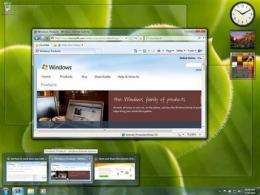
In this screen shot provided by Microsoft Corp., a look at Windows 7 is shown. (AP Photo/Microsoft Corp.)

(AP) -- Next week, Microsoft is releasing Windows 7, a slick, much improved operating system that should go a long way toward erasing the bad impression left by its previous effort, Vista.

If you've been holding off on buying a new computer, Windows 7 will be a good excuse to get back into the game. And if you've been weighing a Mac versus a Windows PC, then you should know that "7" makes Windows more attractive, though not a clear-cut choice for everyone. Windows is now easier to use and better looking than it was before, while maintaining its core advantage of cheaper, more diverse hardware.

However, most PC users should not take the release of Windows 7 as a call to action, or feel that they have to run out and buy the software for use on a computer they're planning on keeping. The upgrade will most likely not be worth the time or money, much less the effort of hosting a Windows 7 "launch party" as suggests.

Windows 7 will come in several versions. The one aimed at U.S. consumers is Home Premium, which will cost $120 if bought as an upgrade to XP or Vista. You can buy it as a download or on a disc. Beginning on Oct. 22, it will come installed on new PCs.

Here are some of its highlights:

- The taskbar - the strip of icons usually found at the bottom of the screen - now does more than show which programs are running. You can also stick icons for your favorite programs on it, to launch them quickly. It's fast and convenient, combining the best features of the old Windows taskbar and Apple's Dock.

- File folders can now be organized into "libraries." You can have a photo library, for instance, that gives you quick access to pictures in folders spread out over your , or even several hard drives. This is great because many applications don't automatically put files into Microsoft's My Documents and My Photos folders, and tend to deposit content in their own folders. The new arrangement also makes for easy backups.

- Like Vista, Windows 7 will ask you twice if you really want to make changes to your settings or install programs, for the sake of security. But Windows 7 does it less often, and the prompts can be turned off.

- Windows 7 can sense if you use more than one finger on your touch pad or touch screen, allowing for neat tricks such as spreading your fingers to zoom into a picture, just like on the iPhone. This is isn't revolutionary per se - computer manufacturers have bolted multitouch sensing on previous versions of Windows. But it does make it easier for them to include advanced touch capabilities, and many of them are planning to do so. That is what could really revolutionize how we use computers. I've tried laptops and desktops with touch screens, and found it nice to be able to directly tap links and buttons, bypassing the touch pad and mouse.

- For a lot of users, the step up to Windows 7 will also mark a transition to a 64-bit . That means computers will now be able to use a lot more Random Access Memory, or RAM, for better performance in demanding applications such as video editing. Vista and XP came in 64-bit versions in addition to the regular 32-bit versions, but the XP version was never popular, and the Vista version became mainstream only last year. But 64 bits will be standard on Windows 7, installed on nearly all new computers.

Windows XP users have a lot more to gain by going to Windows 7. Vista introduced some great features, such as fast searches of the entire hard drive, that of course are present in 7 as well. Unfortunately, upgrading an existing PC from XP to 7 is not easy.

After upgrading, users will have to reinstall all their programs and find their files in the folder where Windows 7 tucks them away.

They may also have hardware problems. I found an old HP laser printer no longer worked with Windows 7. This isn't really Microsoft's fault or, specifically, a problem with the new operating system - HP just doesn't provide a 64-bit driver for that printer. A driver is a program that tells a piece of hardware how to work with an operating system.

If you do upgrade, I would still recommend tackling that transition head-on by installing the 64-bit version of Windows 7, which doesn't cost more. Microsoft recommends a minimum of 2 gigabytes of RAM to run it.

If your computer runs Windows Vista, I think it's hard to justify spending $120 for an upgrade. The new features are nice but hardly must-haves. For daily e-mail and Web surfing, they won't make much of a difference. Vista was much maligned when it arrived in early 2007 for being slow, buggy and annoying. Now, it really isn't that bad, because updates have fixed a lot of the problems.

However, if you bought a Vista-based computer after June 25, you should be eligible for a free upgrade to Windows 7 from the manufacturer, and I suggest taking advantage of it. Your computer likely already is running 64-bit software, so there should be no problems with drivers, and the upgrade is much easier than one from XP. Windows 7 can keep your installed programs and your files in their old folders.

In weeks of testing the final version of Windows 7 on five computers, I encountered only one serious glitch. The backup function simply didn't work on one computer. The error message was obscure as always, and troubleshooting on Microsoft's Web site provided no solution. I ended up using third-party backup software. Given that regular backups are essential for a home computer, one can only hope that this will be an unusual problem that gets fixed promptly.

Another disappointment is that Windows 7 doesn't seem to improve boot-up times. In my tests, it took slightly longer to get going on Windows 7 than with XP or Vista on the same computer. I don't think this should be a major issue, though - instead of shutting your computer down, use "sleep mode" instead. This function has improved a lot since XP, and most computers take about 10 seconds to wake up.

Perhaps the most exciting thing about is that it's inspiring computer manufacturers to try new things, and reviving old ideas like touch-enabled "tablet" PCs. It's breathing new life into the computer market. It just won't do much for old clunkers.

©2009 The Associated Press. All rights reserved. This material may not be published, broadcast, rewritten or redistributed.

Explore further: Ecologists warn of overreliance on unvetted computer source code by researchers

add to favorites email to friend print save as pdf

Related Stories

Upgrade to Windows 7? It all depends...

Oct 08, 2009

With Windows 7 scheduled for release Oct. 22, the question many readers will be asking is, "Should I upgrade?" The answer depends on your circumstances.

Windows 7 is on sale. Should you buy it now?

Jul 08, 2009

(AP) -- Microsoft Corp.'s next installment of Windows doesn't launch until October, but deep discounts on some versions are available through Saturday if you want to pre-order. Before pouncing on this deal, ...

Windows 7 to make public debut May 5

May 01, 2009

Microsoft said Thursday that a nearly-final version of its next-generation Windows 7 operating system will be publicly released on May 5.

Recommended for you

Research finds new channels to trigger mobile malware

May 16, 2013

(Phys.org) —Researchers at the University of Alabama at Birmingham (UAB) have uncovered new hard-to-detect methods that criminals may use to trigger mobile device malware that could eventually lead to targeted ...

Fewer Facebook users take a liking to its new Home software

May 16, 2013

It may be too soon to call Facebook Home a flop. But it's clearly not the breakout hit that some expected. One month after its splashy debut, fewer and fewer people are downloading Facebook's new mobile software. It took ...

Google adds player matching to Android

May 15, 2013

Google is adding leaderboards and the ability to match players in online games to its Android operating system for smartphones and tablet computers.

User comments : 7

Adjust slider to filter visible comments by rank

Display comments: newest first

joseph6Raymond
4 / 5 (2) Oct 14, 2009
This is a bad review. Asides from bad advice, a good review at least provides solid numbers from one's tests and what system configurations were used.

I can't even imagine going back to Vista. Upgrade, you'll be glad you did. (I could understand sticking with XP, but I'm just sick of looking at it, its old. That, and it doesn't have outbound filtering which I love love love about 7.)

Also, if you currently have a 32 bit system, upgrade to Windows 7 32 bit. I don't know where this guy is coming from or how many of these upgrades he's done, but don't just upgrade to 64 bit if you don't know what your getting into. Most hardware works fine, but there's always some manufacturer who doesn't support it for a specific device. If you don't know the difference, google it, learn. You can also check your manufacture(s) website.

Also, college students, you don't have to steal it, http://windows7.d...s/en_US/ . $30 is reasonable, mom/dad would probably pay it for you too
dirk_bruere
not rated yet Oct 14, 2009
I run XP, but I'll wait until I get a new machine in a couple of years, and at least until SP1 is out. Get ready for a slew of articles as Microsoft's real beta testers (the public and virus writers) start finding all the faults.
Bob_Kob
not rated yet Oct 15, 2009
Also I don't know what this guy is talking about that it loads slower than XP or vista, I noticed a HUGE load time improvement when I upgraded from XP, and this is on a low end, ~5 year old computer. He probably didn't format the computer before installing as microsoft recommended.
abhishekbt
not rated yet Oct 15, 2009
What about Gaming? How is gaming on Win 7 compared to Vista?

Anyone tried the same game in the 2 versions (and same hardware) and noticed any differences.
I wouldn't want to upgrade unless there is a serious performance increase.
Since Vista is already DX10 compliant, I don't see much changes in 7, unless ofcourse they optimized much of the OS itself for performance.
Bob_Kob
not rated yet Oct 15, 2009
From what I have read, Vista is very heavy on ram and the like, so they made Windows 7 use ram much better. Theres probably other optimisations underneath.
yimengration
5 / 5 (1) Oct 15, 2009
Hi, to answer your question about gaming on Win 7 look at this link: http://www.guru3d...mance/10

To sum it all up, it really makes no difference right now unless you do not have much ram. There is no point to upgrade right away if you use a lot of 3rd party software (hamachi, cpu-z...ect) as you might run into a few bugs even if they do work. Also ATI's new line of 5000 gpu are the only ones that support dx11 and there are no games for it till next year. I would wait at least till Nvidia releases their 300 line before you make any changes.
joseph6Raymond
not rated yet Oct 15, 2009
@dirk_bruere - If you are waiting to see what hardware comes out for win7, that's understandable. Seems like a lot of companies are going through a refresh/update cycle to go with win7. Don't use viruses as an excuse though. Just think of 7 as a really good SP for Vista.

@Bob_Kob - That's been my experience too. I've tested it on 10 computers so far, all improvements, only one hardware/software issue (very old printer). And i agree with your advice to reformat before installing 7. That's not really a 7 specific thing, you just get your best results when you start on a clean hard drive.

@yimengration - Thanks. I don't game but this is good info to know. I do run Blu Rays though and I notice it auto configures the interface to use less resources while playing the high res video. Took me awhile to notice that too, it's pretty seamless when switching between configurations.

Other thoughts, if your looking for something else to help, get a SSD. They help just about any OS configuration.

More news stories

Goldman Sachs to invest in Japan green energy

US investment banking giant Goldman Sachs said Monday it will start investing in Japanese renewable energy projects, with a reported $2.9 billion outlay over the next five years.

Computer model predicts when viruses become infectious

A new computer model could help scientists predict when a particular strain of avian influenza might become infectious from bird to human, according to a report to be published in the International Journal Data Mining an ...

FDA has safety concerns on Merck insomnia drug

Federal health regulators say an experimental insomnia drug from Merck can help patients fall asleep, but it also carries worrisome side effects, including daytime drowsiness and suicidal thinking.