Review: Nifty scanner eases farewell to paper
November 10, 2010 By PETER SVENSSON , AP Technology Writer

Review: Nifty scanner eases farewell to paper (AP)

Enlarge

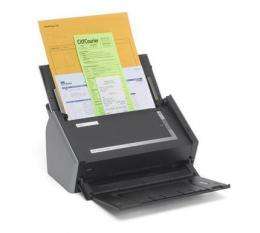
This product image provided by Fujitsu, shows the Fujitsu ScanSnap s1500. The ScanSnap is designed from the ground up to turn stacks of pulp to bytes. It doesn’t have the large glass bed of the conventional scanner or copy machine. Instead, it looks like a small inkjet printer, taking up only a bit more desk space than a lunch box.(AP Photo/Fujitsu) NO SALES

(AP) -- Here's where the iPad has gotten me: I'm sitting with an old book in one hand and a utility knife in the other. My plan is to make the two meet, by cutting up the book and feeding the pages through a scanner.

The printed word has been shackled too long to paper, and I want to carry it around on my .

Cutting a book is hard, though. There's a mental block to overcome. After a lifetime of valuing books, I find it difficult to destroy one, even to preserve it in digital form - particularly if it's a hardback.

The iPad, as a fantastic replacement for paper, deserves only half the blame for putting me in this position. The other half goes to the Fujitsu ScanSnap s1500.

As I started thinking about scanning my documents and "going paperless," I thought about the ideal : It should take a pile of papers and scan both side of each sheet, so I don't have to feed them one by one.

It turns out that there aren't many affordable, consumer-level scanners like that. But all we need is one good device, and the ScanSnap is it. If you can swallow the $430 price tag, it's ideal. It goes through paper like a bonfire.

The ScanSnap is designed from the ground up to turn stacks of pulp to bytes. It doesn't have the large glass bed of the conventional scanner or copy machine. Instead, it looks like a small inkjet printer, taking up only a bit more desk space than a lunch box. It has a 50-sheet holder and feeds each sheet between rollers while scanning both sides at the same time through two thin strips of glass.

It takes just 3 seconds for the ScanSnap to scan a sheet at a decent resolution. That compares with 30 seconds for the two other sheet-fed, double-sided (or duplex) scanners I tried, the $140 Canon Pixma MX870 and the $270 HP ScanJet 5590.

The quality of ScanSnap's output is good, too. The other scanners had problems with pulling the paper at an even pace past the scanning slit. That resulted in letters that were either stretched out - too tall - or squished. That "funhouse effect" was nearly absent on the ScanSnap. It was also better at pulling the paper straight across the slit, avoiding skewed lines.

What if you forget to take out the staples from your tax return before stuffing it in the scanner? No problem! The ScanSnap is smart enough to figure out if two sheets are sticking together, and it will stop so you can fix the problem. Return the sheets to the feeder, hit a button and scanning resumes.

So what's the point of scanning your documents? Well, it's an easy way to organize everything. Like most scanners, the ScanSnap comes with software that "reads" the scans, making them searchable. Scanning also makes it easy to send documents around - if your mortgage broker needs your utility bill, it's easier to scan and e-mail it than to fax it. And obviously, scans take less space than binders full of documents.

Because the ScanSnap is so fast, it's tempting to scan books as well. You could carry a couple of bookshelves worth of scanned books on the iPad.

Copyright law gets in the way of that vision, though. You don't have a blanket right to scan your books. This probably comes as a surprise to people who have been "ripping" their CDs for a decade. The music industry doesn't challenge this practice, but that doesn't mean it's legal, strictly speaking.

Although copyright law is complicated, one thing is clear: Books published in the U.S. before 1923 are fair game. I bought a collection of fairy tales from 1913, and after steeling myself, cut the pages from the spine. It helped my conscience that the binding was already in poor condition. It took 10 minutes for the ScanSnap to turn it into a lovely PDF file, with the color illustrations intact. I loaded the file into the GoodReader app on the iPad, and it looked glorious.

One odd thing that needs mentioning is that the ScanSnap comes in two versions, for Windows and Mac. The printers are identical. Only the bundled versions of the PDF-editing software, Adobe Acrobat, are specific to Windows or Mac. However, the basic software that comes with each printer works on Windows and Mac, and that is sufficient to create PDFs. So one scanner will work OK even if you have both Windows and Mac computers in the house.

Secondly, the ScanSnap isn't quite a replacement for a good flatbed scanner if you want to scan photos. It's optimized for speed, not photo reproduction.

The Pixma and the ScanJet aren't necessarily bad products. They simply lack the ScanSnap's focus on scanning stacks of paper. Both have flatbeds for careful photo scanning, and the Pixma works as a color and a fax machine. They're also cheaper than the ScanSnap, but if you have a lot to scan, it's the one that's a bargain.

©2010 The Associated Press. All rights reserved. This material may not be published, broadcast, rewritten or redistributed.

Filter


Move the slider to adjust rank threshold, so that you can hide some of the comments.


Display comments: newest first

Ravenrant
Nov 10, 2010

Rank: 5 / 5 (1)
The so-called paperless revolution that was supposed to be ushered in by the computer age never happened. The truth is that the computer age has probably quintupled the amount of paper used to do a given task. Between mistakes which are easy to fix with a reprint, crappy software that causes mistakes that can't be seen until printed, inadvertent printing, printing errors and human errors, the switch from pen to computer has been a godsend for paper manufacturers.
MorituriMax
Nov 10, 2010

Rank: not rated yet
Really? He's really worried about copyright law when he considers scanning his books into his iPad? Really? Seriously, he thinks someone is going to bust his door down and inspect his bookshelves for dust-free spots where books used to be and then have to account for where they went???
Matthew_Corby
Nov 10, 2010

Rank: 5 / 5 (1)
actually we're still in the middle of the paperless revolution, we're still evolving. ebooks have recently been refreshed with e-ink, which makes reading a long novel easy on the eyes. my kindle 3 automatically gets my newsfeeds for $1.99 a month via 3G. color e-ink is in the works. "smart" pens such as the livescribe pulse make digital backups of paper notebooks. The newer smaller tablets are making leaving paper notebooks behind easier. trust me, its coming, it may be decades still, but it's coming. i think the main problem right now is DRM is handled the wrong way. when i buy a book i want to keep it until i'm an old man. but when i buy an e-book it's only as good as long as the company i bought it from is around. what's gonna happen if 10 years from now amazon goes belly-up or if the kindle format becomes obsolete and is no longer supported? the government needs to step up and handle liscenses for ebooks, music, etc. for me to feel safe paying big bucks for it.
DamienS
Nov 10, 2010

Rank: 5 / 5 (2)
when i buy an e-book it's only as good as long as the company i bought it from is around. what's gonna happen if 10 years from now amazon goes belly-up or if the kindle format becomes obsolete and is no longer supported?

That, in a nutshell, is the problem with all electronic media storage.
CreepyD
Nov 11, 2010

Rank: 5 / 5 (1)
I wish DRM would just die already. All these stupid restrictions just stop you watching/reading/listening to what ever it is you actually paid for.
This is a nice scanner though, I have one! Funny it comes with Adobe Standard 9, which is worth as much as the scanner itself lol
dsl5000
Nov 11, 2010

Rank: 5 / 5 (1)
Paperless revolution is still ongoing. It will be an interesting effect. it might result in people unable to write lol. Kind of like cursive. They taught it in elementary school and said we would use it as adults....haha rarely.

People who are fighting against this revolution are newspaper co, journals, paper makers, etc.

It's like oil, it'll undercut alternatives and or buy them out and shelve them.
MorituriMax
Nov 11, 2010

Rank: not rated yet
God help us if down the road we somehow drop out of the computer age to a pre-computer age, like Nuclear War, Asteroid impact, etc. It's going to suck if we can't access all the knowledge we have accumulated electronically. Sort of a future version of the Library of Alexandria burning down, but world-wide.

I am excited by the news of the color e-ink stuff coming out, don't have a kindle yet, iPad and iPhone with kindle apps, but if they get a color kindle out the door, I'm buying it.

I think first and foremost we need to develop technology that will provide power without the need for an electrical generation grid. Better solar power, etc, or even self-contained cold/warm/fusion (yeah we can dream) so our data isn't going to be held hostage by access to the power to keep it going.
gah
Nov 11, 2010

Rank: not rated yet
This is more important than it may first appear..I have an older ScanSnap, and it has been WONDERFUL. Recently decided to scan a basement full of journals (2000+ ?), so also got a Fujitsu fi-6140 professional scanner (the fi-6130, slower, may be fine for most folks). Also got a Martin-Yale 3000E paper cutter for trimming binding. Scanner included Adobe 9, which works well with scanner and it far exceeded expectations on converting scanned stuff to searchable PDF. Project's gonna take a while but the e-archive thing (along with cheap drives) is now becoming actually doable.

Rank 3 /5 (5 votes)
Relevant PhysicsForums posts

More news stories

MIT researchers devise new means to synchronize a group of robots (w/ Video)

(Phys.org) -- For several years, roboticists have been working out ways to get a group of robots to perform synchronized activities as demonstrated most often in dance routines. It’s not just about trying ...

Electronics / Robotics

created 8 hours ago | popularity 5 / 5 (1) | comments 1 | with audio podcast report

OmniVision tops up sensors for cameras, phones

(Phys.org) -- OmniVision has announced two high-resolution image sensors for the digital still and digital video camera market (DS/DVC) and higher end smartphones. In end-user language, it is a claim for superior ...

Electronics / Hardware

created 13 hours ago | popularity 5 / 5 (6) | comments 2 | with audio podcast report

Nvidia says Kai platform will turn price tide for tablets

(Phys.org) -- In March, Nvidia gave some signs that they were working to lower the cost of their Tegra 3 processors and they suggested consumers might see prices for Android tablets as low as $199. Connect ...

Electronics / Hardware

created May 24, 2012 | popularity 4.3 / 5 (4) | comments 3 | with audio podcast report

Raspberry Pi to add camera later this year

(Phys.org) -- The Raspberry Pi, a uniquely priced, no casing computer that plugs into your TV and a keyboard., will be given a camera accessory later this year. That may be “oh-so-what” news if this ...

Electronics / Hardware

created May 22, 2012 | popularity 5 / 5 (4) | comments 1 | with audio podcast report

Several iOS developers welcome Apple's larger-screen iPhone

The sixth-generation iPhone is expected to have a larger screen, and several iOS developers say they would receive that change with a warm welcome.

Electronics / Consumer & Gadgets

created May 24, 2012 | popularity 1 / 5 (2) | comments 0


It's in the genes: Research pinpoints how plants know when to flower

Scientists believe they've pinpointed the last crucial piece of the 80-year-old puzzle of how plants "know" when to flower.

Tongue analysis software uses ancient Chinese medicine to warn of disease

For 5,000 years, the Chinese have used a system of medicine based on the flow and balance of positive and negative energies in the body. In this system, the appearance of the tongue is one of the measures used to classify ...

Yahoo kills 'Livestand' just 6 months after debut

(AP) -- Yahoo is killing a tablet magazine called Livestand just six months its debut on the iPad.

Dragon makes history with space station docking

The private company SpaceX made history Friday with the docking of its Dragon capsule to the International Space Station, the most impressive feat yet in turning routine spaceflight over to the commercial ...

Most occupational injury and illness costs are paid by the government and private payers

UC Davis researchers have found that workers' compensation insurance is not used nearly as much as it should be to cover the nation's multi-billion dollar price tag for workplace illnesses and injuries. Instead, almost 80 ...

High-speed method to aid search for solar energy storage catalysts

Eons ago, nature solved the problem of converting solar energy to fuels by inventing the process of photosynthesis.