Review: Seeking a keyboard that enhances the iPad
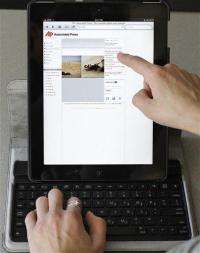
(AP) -- The great thing about using an iPad is that you can tote around a skinny device instead of lugging your laptop. The bad thing is that the iPad's virtual keyboard isn't great for extended typing sessions. It's fine for dashing off emails, but I wouldn't use it to type up this article.
Fortunately, a market has sprung up to solve this problem: physical keyboards that work with the iPad, either on their own or as part of iPad cases. I tested four of them, and I wrote this review using one.
These devices all had several things going for them. All were easy to connect with the iPad, either wirelessly via Bluetooth or, in the case of Apple's physical keyboard, a dock connector. They all had a row of buttons to do such things as control music playback or switch to the home screen.
But some of them were bulky, difficult to type on or awkward to set up. And none of them worked for scrolling through Web pages.
Here's a look at the ones I tried.
Belkin Keyboard Folio for iPad 2 ($100):
The Keyboard Folio's material felt cheap, though it did look as if it might be somewhat stain resistant. The process for propping up the iPad or putting it away was complicated. The case was bulky when folded up, too.
Of all the ones I tested, the Keyboard Folio had the most options for viewing angles, which I appreciated. But I could only use it in landscape mode, not turned like a skyscraper. It also took up the most space of the four I tested - from about 9 inches to more than a foot, depending on how I had it angled. This made it difficult to use in a tight space.
I appreciated its decent-sized keyboard, which included dedicated buttons for the "at" symbol and ".com." It felt a bit cramped at first, but it was second only to Apple's full-sized keyboard dock when it came to ease of use. Because of this, I used the Keyboard Folio to type up this review.
Targus Versavu Keyboard and Case for iPad 2 ($100):
Targus' black, synthetic leather keyboard case looks weird at first, with a large circular hole in the center of the cover to frame the iPad's apple logo.
As it turns out, the circle is actually a mechanism that allows you to twist your iPad so you can view the screen in landscape or portrait mode while using the keyboard.
Unfortunately, you can't adjust the screen's viewing angle, so you're stuck with a very straight-looking screen in either orientation. This would be a pain if you wanted to tilt the display to make it easier to see.
More egregious to me was the confusing, cramped keyboard layout. To conserve space, Targus moved a few things around - notably, the key that controls the colon and semicolon and the one that controls the question mark and forward slash. Both are usually on the right side by the "enter" and "shift" keys.
Moving them made it a lot harder to type accurately. Nearly every time I tried to type an apostrophe or quotation mark, I hit "return" instead, which resulted in some awkward instant-messaging conversations.
A couple of positives: The Versavu is easy to set up - you just snap the iPad into the hard plastic shell. And you can use a sturdy elastic band that comes with it to keep the case securely closed.
Kensington KeyFolio for iPad and iPad 2 ($100):
The Kensington KeyFolio may look appealing to spill-prone iPad users, as its keyboard is encased in a rubbery material that can be easily cleaned with a damp cloth.
Sadly, this same feature makes the keyboard a major pain to type with. The rubbery casing made the keys feel soft and squishy, rather than hard and satisfying. The keyboard felt too small, and a decision to move the key that controls the quotation mark and apostrophe resulted in lots of typos.
The KeyFolio isn't all bad, as it has a couple of viewing angle options. It's also extremely obvious how to use it, as you clearly just slip the iPad in and prop it up.
Apple iPad Keyboard Dock ($69):
The Apple dock isn't very portable, as the portion that connects to the iPad sticks straight up from the keyboard. It's also not that flexible for viewing because it docks the iPad in portrait mode at a fixed angle.
But it's a stylish, simple option if you're planning on using the iPad at work or want to have an easy computer alternative at home. It doesn't take up much space, and it has a full-sized keyboard that is very easy and comfortable to type on.
(If you want a more portable Apple-branded keyboard, there's also a wireless one for the same price. You'll also need a case or stand to keep the iPad upright, though.)
The back of the docking station includes a connector to attach your iPad power supply, in case you want to charge it while typing. There's also a line out if you want to hook up external speakers. I appreciated that the keys across the top of the keyboard include two that you can use to quickly control the brightness of the iPad's screen.
There wasn't one clear winner here, as each had its own issues. Yet even with flaws, some were able to bring the iPad closer to replacing a laptop.
©2011 The Associated Press. All rights reserved. This material may not be published, broadcast, rewritten or redistributed.


