Review: Apps can enhance smart phone cameras
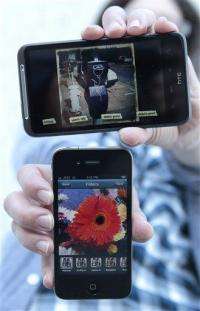
(AP) -- Frankly, I can't remember the last time I picked up my digital camera. Since a smart phone is always on me, either in my bag or back pocket, I use its camera constantly while my perfectly capable point-and-shoot sits on a shelf at home gathering dust.
I know I'm not alone. As cell phones have gotten better and better, their built-in digital cameras have advanced immensely. While they're still not as good as dedicated cameras, smart phones have a couple of big advantages on their side: they run third-party software, and they have Internet access.
That means I can add applications that let me manipulate photos in interesting ways, using the phone's touch screen to go beyond the "black and white" and "vivid color" modes of dedicated cameras, and then share the results.
Here's a look at some noteworthy apps that can make your photos pop:
Instagram (iPhone, free): Instagram is as much of a social app as it is a camera app, and it makes it easy and quick to share artistic shots with your buddies.
After downloading the app and signing up, take a photo or choose one from your photo roll. Then, choose from more than a dozen "filters," or manipulation schemes, that are conveniently previewed at the bottom. The filters generally give photos an old-fashioned look - not surprising since the team behind the app, Burbn Inc., cites Polaroid cameras as an inspiration. (The language of old-school photo buffs permeates the apps. Photographers who shot on film used to manipulate their photos with clear glass "filters" they put in front of their camera lenses.)
You can add a description and location to your photo, and then add it to your Instagram photo feed, which shows the photos you and your friends have posted. You can publish your photos to a number of other social sites as well, including Twitter, Facebook, Flickr and Foursquare.
I enjoyed scrolling through the photos my friends had posted, "liking" the ones I thought were best and commenting on some. I quickly got used to checking out the list of most popular photos, which is an excellent, ever-changing source of beautiful shots (and, potentially, new people to follow on Instagram).
Camera Bag (iPhone, $1.99): One of the simplest apps I tried, Camera Bag consists mainly of a collection of filters that, like Instagram, you can apply to photos you take with the app or the iPhone's built-in camera app.
Within Camera Bag, you take a shot and are then given the option to re-take or use that photo. If you choose to use it, you can then scroll sideways through the list of 13 filters - "infrared," "fisheye," "silver," "1974" and more - to see a preview of how the photo will look. You can save a copy of the photo with one filter, or several copies with a filter apiece, and e-mail them to friends.
It was easy to use the app, which was created by Nevercenter Ltd., to jazz up my photos. I especially liked the "fisheye" lens filter and the way the "Plastic" filter brought out orange and blue tones. If you are looking for an app that will give you a ton of options, however, Camera Bag may be too simple.
Vignette (Android, $4.01): My favorite of the Android camera apps I tried, Vignette includes a ton of camera, film and lens effects that can be used to create all sorts of images.
There are plenty of effects: "Vignette" will focus on the middle of the shot and "Velvia," named after a famous slide film, brightens up colors. The "dreamy" lens effects will soften up the image and "random" will just apply an effect of the app's choosing. You can use filters to highlight certain colors, instruct the app to switch one color out with another and choose from a slew of vintage tints or toy camera effects.
The app, which comes from developers neilandtheresa, also lets you customize settings to your liking by scrolling down a long list of options: For example, if you want to take photos with a grainy-looking film, soft-focus halo, magenta filter, extra "light leaks" (as if streak of light had hit film in a broken camera) and a timestamp like you'd see on a digital camera, you can just check these boxes and start snapping.
While I spent more time futzing with Vignette's setting than with other apps I tried, I also got the most interesting, varied shots with it. Wandering around a local park, it helped me brighten up the blue sky and highlight the yellow of a bell flower with the sun shining through. In another image, the park's green grass and treetops shone chartreuse while the sky, cars and tree trunks showed up in black, white and gray.
Beyond all these effects, Vignette includes a variety of adjustable camera settings, including contrast, saturation, sharpness, exposure and white balance. There's also an option to touch the screen anywhere to take a photo, which I found useful since I was testing the app on a phone that doesn't include a dedicated camera button.
Compared to other camera apps, Vignette is pricey, but its capabilities make it worth the cost. And if you're curious to try it out but don't want to commit just yet, there's also a free demo version available.
Retro Camera (Android, free): As its name implies, Retro Camera lets you take photos that look as if they were shot with old-style cameras. The app, which comes from Urbian Inc., includes the app developer's takes on five different "cameras" that you can shoot with: The Barbl, Little Orange Box, Xolaroid 2000, FudgeCan and Pinhole. Each camera can be used in color or black-and-white mode, and the images I got were definitely retro and cool-looking.
My favorites were The Barbl and Little Orange Box, which are modeled off of a `50s East-German camera and a `70s Russian camera, respectively. Shots I took with The Barbl looked a little washed-out, while those taken with Little Orange Box were high-contrast and sharp-looking, occasionally with scratches on the images.
I also loved some of the app's quirky touches, such as the way the "camera" you're using fills up the phone's screen and gives you its own little viewfinder, and how the photos you've taken are arranged on a virtual clothesline, clasped by virtual clothespins - a reference to how photos were hung to dry after processing in a darkroom.
Jelly Lens (Any cell phone, price varies): Who says smart phones should have all the fun? As long as your cell phone has a camera you can use a little gizmo called the Jelly Lens to add special effects to any photo you take (and if you do have a smart phone, you can use this with any app you like).
Much like the glass filters employed by old-time photographers, the Jelly Lens is a little plastic lens filter with a sticky ring on its back that you can attach to the lens of any small camera. Each Jelly Lens comes with one built-in filter with an effect like "kaleidoscope," "stretched" or "wide angle."
I bought one with a "starburst" effect that blurs the edges of the image to create a sometimes-dreamy, sometimes-streaky shot, depending on what I was photographing. Through the Jelly Lens, an ice-cream-stick sculpture on my mantle became a psychedelic work of art. And I liked that the focal point on the filter was slightly off-center, so I could turn it to choose my focus.
I appreciated the Jelly Lens' built-in keychain and cell phone loop - definitely useful since it could easily get lost. I wasn't that thrilled with its level of stickiness, though, as it often fell off the back of my phone. You can wash it with soap and water to remove any gunk that gathers and make it sticky once again, but I only had limited success with this.
You can buy a Jelly Lens online from Kikkerland ( www.kikkerlandshop.com ) for $7.50 apiece, or for varying prices on Amazon and elsewhere on the Web.
©2010 The Associated Press. All rights reserved. This material may not be published, broadcast, rewritten or redistributed.


